Introduction
You probably already know about robots.txt, the file that tells Google’s crawler which pages it can and cannot visit. But there’s a newer file that matters just as much in 2026 is llms.txt.
It doesn’t control Google. It talks to AI.
As ChatGPT, Perplexity, Claude, and Gemini increasingly answer questions directly, without sending users to your site getting cited in those answers has become a real marketing problem. LLMs.txt is one of the most practical things you can do about it.
This guide explains what it is, how it works, and how to create one for your site.
What Is LLMs.txt?
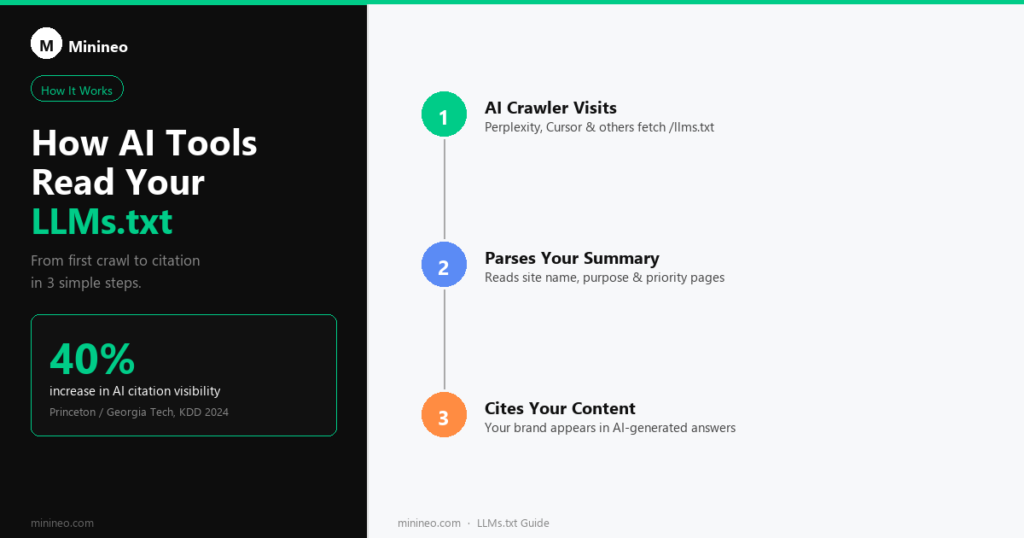
LLMs.txt is a plain text file written in Markdown that you place at the root of your website (e.g. yourdomain.com/llms.txt). It gives AI language models a clear, structured summary of your site, what you do, which pages matter most, and how to understand your content.
Think of it as a welcome note for AI crawlers.
The specification was proposed on September 3, 2024 by Jeremy Howard, co-founder of Answer.AI and fast.ai. His argument was simple: websites have always had ways to communicate with traditional crawlers, but nothing existed to help LLMs understand a site’s purpose and priority pages. LLMs.txt fills that gap.
The official specification lives at llmstxt.org.
Why Does It Matter?
Traditional SEO gets your page into Google’s index. GEO (Generative Engine Optimization) gets your content cited inside AI-generated answers.
These are different problems.
A 2024 study from Princeton University and Georgia Tech, presented at the KDD 2024 conference, found that targeted GEO techniques can increase content visibility in AI responses by 30 to 40%. The tactics that worked best included adding verifiable statistics, authoritative citations, and clearly structured information, exactly what LLMs.txt helps you do.
When AI tools can easily read and understand what your site is about, you’re more likely to be cited. And citations matter: research shows that when brands appear in AI-generated answers, they see a 38% lift in organic clicks.
What Does LLMs.txt Actually Look Like?
The format is straightforward. Here’s a simplified example:
# Acme Co

> Acme Co builds project management software for remote teams.

## About

- [About Us](https://acmeco.com/about): Company background and mission
- [Features](https://acmeco.com/features): Full list of product features

## Documentation

- [Getting Started](https://acmeco.com/docs/start): Quick setup guide
- [API Reference](https://acmeco.com/docs/api): Full API documentation

## Blog

- [Remote Work Productivity](https://acmeco.com/blog/remote-work): Tips for distributed teams
The structure has three parts:
- H1 title – your site or brand name
- Blockquote summary – one or two sentences describing what you do
- Sections with links – grouped by topic, with short descriptions for each URL
The spec also allows for an optional llms-full.txt file, a single Markdown document containing the full content of your site for AI tools that want to read everything at once.
Who’s Already Using It?
Adoption is growing fast. Notable companies that have published LLMs.txt files include:
- Stripe
- Cursor
- Zapier
By mid-2025, around 951 domains had published llms.txt files. That number has grown through 2026 as AI search has gone mainstream but it’s still a fraction of the web, which means publishing one now still puts you ahead of the majority of sites in your niche.
Which AI Tools Read LLMs.txt?
This is an important question and one that’s still evolving. The specification is a proposal, not an enforced standard, meaning not every AI tool automatically reads it.
What’s confirmed:
- Perplexity has indicated support for the format
- Cursor (the AI code editor) actively uses llms.txt to understand documentation sites
- Various AI agents and tools that do web research use it when crawling
What’s still unclear:
- ChatGPT’s web browsing does not officially document llms.txt support
- Google’s AI Overviews has not confirmed it reads the file
That said, the file does no harm and takes minutes to create. Even if only some tools read it today, the standard is gaining momentum and aligns your site with where AI search is heading.
How to Create Your LLMs.txt File (Step by Step)
Step 1 – Write your summary
Open a text editor. Start with your brand name as an H1, then add a blockquote (using >) with a one or two sentence description of your site.
Step 2 – List your most important pages
Group them into sections – About, Products, Documentation, Blog, etc. For each link, add a short description so the AI understands what it will find there.
Step 3 – Prioritise ruthlessly
You don’t need to list every page. Focus on the pages that best represent what you do and what you want to be known for. If you have 200 blog posts, pick your 10 most authoritative ones.
Step 4 – Upload to your site root
Save the file as llms.txt (not llm.txt) and place it at yourdomain.com/llms.txt. On WordPress, you can upload it via FTP or your hosting file manager.
Step 5 – Verify it
Visit yourdomain.com/llms.txt in your browser. If it loads and displays correctly, you’re done.
Common Mistakes to Avoid
Listing every page – AI tools benefit from curation, not comprehensiveness. Include only the pages you want to be known for.
Skipping descriptions – A bare list of URLs tells an LLM nothing. Each link should have a brief explanation of what the page contains.
Confusing llms.txt with robots.txt – LLMs.txt doesn’t block or allow crawlers. It’s a guide, not a gate. Robots.txt still handles permissions.
Writing it once and forgetting it – Update your llms.txt when you publish major new content or change your site’s focus.
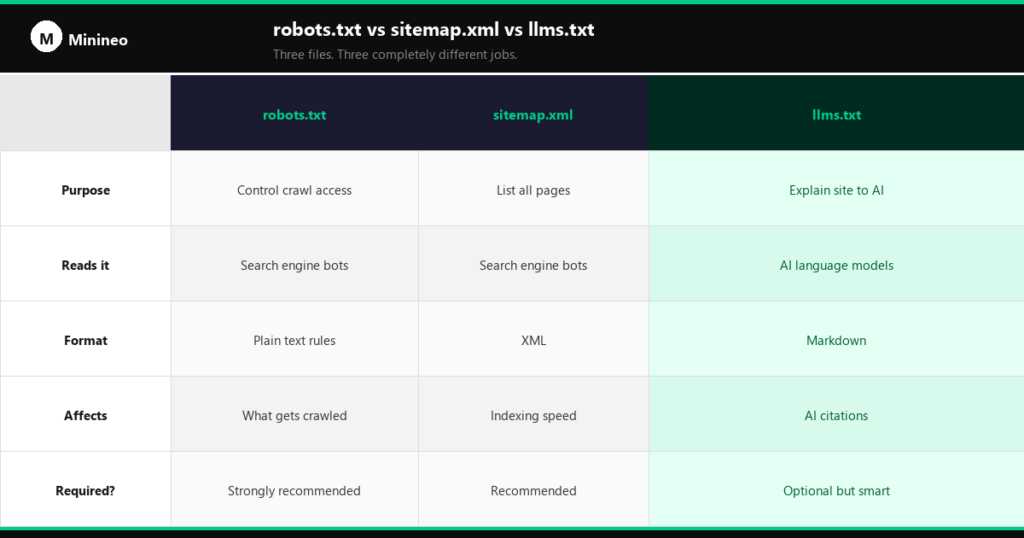
LLMs.txt vs robots.txt vs sitemap.xml
| File | Purpose | Audience |
|---|---|---|
robots.txt | Controls crawl access | Search engine bots |
sitemap.xml | Lists all URLs for indexing | Search engine bots |
llms.txt | Explains site purpose and priority pages | AI language models |
These three files are complementary. A complete setup has all three.
Create Your LLMs.txt in Under 2 Minutes
If you’d rather not write it manually, Minineo’s free LLMs.txt Generator builds a properly formatted file from your site details in seconds. Fill in your brand name, description, and key pages and it outputs a ready-to-upload file.
The Bottom Line
LLMs.txt is one of the simplest things you can do to improve your AI visibility. It takes less than an hour to set up, it’s free, and it directly addresses the core challenge of GEO, helping AI tools understand what your site is about so they cite it in answers.
Traditional SEO is about ranking. AI visibility is about being cited. LLMs.txt is a small file with a meaningful impact on the latter.