Start with the pages that help customers decide whether to buy. Save what the audit found, confirm each problem, and fix access issues or incorrect product details. Then improve missing or unclear answers and repeat your original checks to see what changed.
An audit might flag missing markup, weak content, competitor mentions and an outdated product description. An incorrect price needs a different response from a missing explanation of how your product works. Decide what each finding means for a potential customer before assigning the work.
This plan gives a small marketing team a month to check the findings, make changes and review the results. New citations or recommendations may take longer to appear.
Your 30-day AI visibility action plan at a glance
| Period | Main job | What you should have at the end |
|---|---|---|
| Days 1–3 | Validate the audit and save a baseline | A fixed prompt set, saved answers and a short list of priority pages |
| Days 4–7 | Resolve verified access and information problems | Documented fixes, tested pages and corrected product facts |
| Days 8–14 | Improve pages that support buying decisions | A few substantive updates with clear answers and evidence |
| Days 15–21 | Fill important gaps and improve discovery | Useful new content where needed, internal links and relevant profile corrections |
| Days 22–30 | Repeat measurements and review business outcomes | A before-and-after report and the next month’s priorities |
Use the schedule as a starting point. If a firewall blocks your key product pages, fix that before creating more content. If access is healthy but the answer engines describe an old version of your product, focus on the information they can find.
Days 1–3: Find out what the audit actually measured
Read the pages and saved AI answers behind each audit finding.
A readiness audit examines your website: access, page structure, content gaps and other checks. An answer audit examines what an AI product actually returned for a set of prompts. Some reports combine both. A strong readiness score cannot establish that buyers see your brand in answers.
For each finding, ask: Which page or answer produced this flag? What was the exact question? Can we reproduce the issue? What would count as fixing it?
Choose one business outcome
Pick an outcome narrow enough to guide the month’s work. For a SaaS product, that could be qualified signups from people looking for a specific integration. For a store, it could be purchases in one product category. For an agency, it might be relevant consultation requests.
For example, a content platform could aim to attract teams looking for WordPress publishing software and track their signups. That goal helps the team choose which questions to monitor and which pages to improve.
Keep a stable set of buyer questions
For a manageable pilot, start with 12–20 questions drawn from sales calls, support messages and customer research. This is a suggested workload, not a statistically validated sample size or an estimate of how many people ask those questions.
For example, a content platform might track:
- Which tools let a small marketing team create and publish blog posts to WordPress?
- What should I compare when choosing an AI content platform for several client websites?
- Which platforms combine website audits with content creation?
- Does [brand] support Shopify publishing?
Keep unbranded discovery questions separate from branded accuracy checks. A prompt that already names you cannot show whether an unfamiliar buyer would discover you. Minineo’s guide to AI tracking prompts explains how to build that set.
Choose the answer products your customers use, whether ChatGPT, Gemini, Claude, Perplexity or Google Search’s AI features. Record each product and search mode separately. Start fresh conversations for baseline runs and keep available settings consistent; this reduces contextual differences without eliminating variation.
Save the exact prompt, date, language, intended market, available model or mode label, answer text and cited URLs. Record the actual test setup: asking about India is not the same as verifying that a tool ran from India. Keep failed requests distinct from valid answers that omit your brand.
Define your measures before making changes
For this plan, use these working definitions:
- Mention: the answer names your brand.
- Recommendation: the answer presents your product as a suitable option for the question.
- Owned-site citation: an answer links to a page on your domain as a supporting source.
- Accuracy issue: a verifiable statement about your product is wrong or out of date.
Count each outcome at most once per response. Keep citations to third-party coverage in a separate field. Also distinguish an inline citation from a URL that appears only in an additional sources list.
Owned-site citation rate = responses with at least one owned-site citation ÷ valid responses evaluated × 100.
For example, 12 questions run twice on one platform produce 24 valid responses. If six contain an owned-site citation, the observed rate is 25%. That describes the test set only; it is not your share of all AI searches. Keep those same questions and repeat counts for the later comparison.
Days 4–7: Fix barriers and incorrect information
Start with a few commercially important pages: a product or service page, pricing, a relevant use case and a useful guide. Have the person responsible for the website verify access, response codes, indexing directives, canonical URLs and whether important content is available as readable text.
Check access for each search product
OpenAI’s crawler documentation identifies OAI-SearchBot as its search crawler. GPTBot has a different purpose: potential model training. OpenAI says these controls are independent, so allowing the training crawler is not a substitute for checking search access. Review both robots.txt and security rules that might reject legitimate requests.
Other platforms have their own controls. Perplexity’s crawler guidance describes PerplexityBot’s role in surfacing and linking websites in search results. Anthropic’s crawler guidance distinguishes Claude-SearchBot from its other bots. Ask your developer to use each provider’s current verification guidance; a user-agent name alone is not proof of a request’s identity.
For Google AI Overviews and AI Mode, Google’s eligibility requirements state that a supporting page must be indexed and eligible for a search snippet. Its normal search requirements apply; there is no additional AI-specific eligibility requirement.
Remove accidental barriers from public pages you want people to find. Keep private pages and intentionally restricted content protected.
Correct the facts that could lose a sale
Check your pricing, integrations, service area, availability, product limitations and contact details against the answers you saved. If an answer is wrong, inspect its cited source rather than assuming the error began on your website.
Correct your main product and pricing pages first. Then review older articles and profiles you control. If an independent page is outdated, send its publisher a factual correction supported by a public source. Updating a source does not guarantee an immediate change in AI answers, so keep the error in your monitoring log.
Week-one completion check: every priority issue has an owner, evidence, a next action and a verification method. Test access fixes before marking them complete.
Days 8–14: Improve the pages buyers need
Read the competing pages cited for your target questions. Ask what useful information they provide that your page does not. It could be setup instructions, an explicit limitation, pricing conditions or evidence that the product works for a particular audience.
Start by improving existing pages where they already match the question. A missing integration detail usually belongs on an integration or product page. It does not automatically justify a new article.
Replace broad promises with verifiable answers
For a product that supports WordPress publishing, the difference might look like this:
Vague copy: “Publish better content faster with powerful automation.”
Useful copy: “Create a draft, review its claims and formatting, then publish the approved post to your connected WordPress site.”
The second version tells the buyer what happens and where human review fits. Add actual product screenshots, setup requirements and relevant plan restrictions. Do not add capabilities because they appear in a competitor’s answer.
Answer the main question early. Explain who the product suits, how it works and what it cannot do. Put supporting links beside claims. Use tables where readers need to compare the same attributes across options.
Support claims with evidence
Useful evidence might include a documented test, a real product demonstration, a calculation with its assumptions or a customer example published with permission. If you have no case study, use a worked example and label it as illustrative.
Google’s content guidance emphasizes originality, clear sourcing and accurate authorship. It also explains that E-E-A-T is not a single ranking factor. An author box cannot replace the evidence in the article.
Have the person who knows the product review the claims. Attribute their contribution accurately if they agree to be named. Run the final draft through a content quality checklist, including links, examples, product facts and the next action offered to the reader.
Week-two completion check: each revised page answers an identifiable buyer question, includes support for its claims and offers a relevant next step.
Days 15–21: Fill the gaps that matter
Review the questions your updated pages still leave unanswered. Create a new page when a question needs its own explanation or use case.
A small team might publish one use-case guide and one comparison during this week. Publish only what your team can support with evidence and review properly.
Use a brief that connects the question to the sale
Before writing, fill in these six fields:
- Buyer question: what is the reader trying to decide?
- Current gap: what is missing or unclear in the available answers?
- Page choice: why does this need a new page instead of an update?
- Evidence: which product facts, demonstrations or original examples support the answer?
- Next step: what can an interested reader do?
- Measurement: which prompts, landing-page visits and business events will you review?
For a WordPress publishing platform, the next step might be connecting a test site or creating a first draft. A pricing comparison might lead to plan selection. Match the action to the reader’s stage instead of ending every article with the same generic sales pitch.
Make the improved pages discoverable
Add relevant internal links from existing pages that already discuss the subject. Use link text that explains what the destination offers. Check that the destination is live, uses the intended canonical URL and appears in the appropriate sitemap.
Review the third-party sources cited in your baseline answers. Prioritize accurate listings and useful contributions where your audience already looks for information. Focus on sources relevant to the buyer’s task, such as an integration directory for the software they use.
If you publish a comparison, apply the same criteria to every product. Explain how you checked features and pricing. Do not describe desk research as hands-on testing or manufacture independent endorsements.
Week-three completion check: each new page fills a documented gap, has useful internal links and has passed an editorial review. Any outreach asks for an accurate correction or offers useful evidence.
A worked example of how to prioritize the audit
Imagine a small software company whose product can publish to WordPress. Its audit finds four issues. The following example is fictional and illustrates prioritization; it is not a Minineo customer result.
| Finding and evidence | Priority | Action and owner | Completion check |
|---|---|---|---|
| A security rule rejects verified search-crawler requests to the integration guide | First: verified access barrier | Developer reviews and corrects the relevant rule | Legitimate requests receive the intended page successfully |
| A saved AI answer repeats an old price from a page the company controls | First: buyer-facing factual error | Product marketer corrects that page and checks related pricing references | Public pricing is consistent; later answers are monitored separately |
| The integration page does not explain setup or publishing permissions | Next: missing decision information | Content owner adds verified instructions, a screenshot and limitations | A reader can assess requirements and follow the documented setup |
| The audit flags missing FAQ markup on a page with clear visible answers | Later: no demonstrated access or buyer problem | SEO owner checks whether a supported use case justifies markup work | Work proceeds only with a defined benefit and applicable requirements |
This order addresses the access barrier and incorrect price first, then the missing setup instructions. The FAQ markup issue can wait until the team establishes a reason to change it.
Copy these columns into your own tracker, then add the affected URL, due date, publication date and a link to the before-and-after evidence. Keep “change shipped” and “visibility improved” as separate statuses.
Days 22–30: Measure changes without overstating them
Repeat the baseline questions using the same recorded setup. Read the full answers and check their sources. Compare each platform and question group separately so a change in one does not hide a decline in another.
For a small pilot, a baseline, a mid-month check and an end-of-month check can make the workload manageable. Repeat runs within each check where feasible. A few checks can reveal changes worth investigating, but they are not enough to establish a reliable trend.
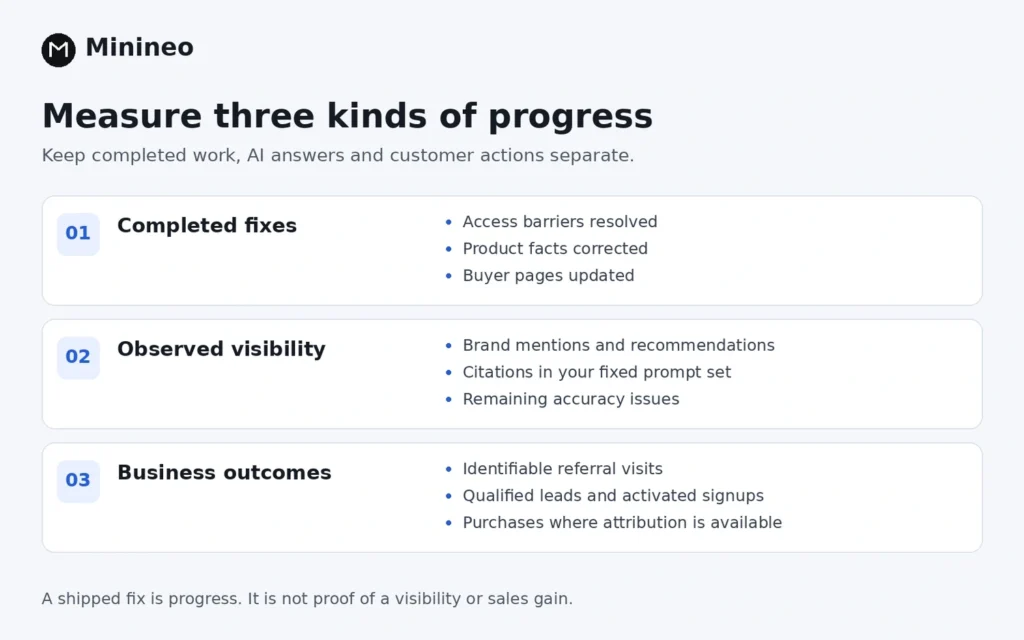
Report three kinds of progress
- Implementation: verified access fixes, corrected facts and substantive page updates.
- Observed visibility: mentions, recommendations, owned-site citations and remaining accuracy issues in the fixed sample.
- Business outcomes: identifiable referral visits, qualified leads, activated signups or purchases.
Suppose owned-site citations rise from six of 24 valid responses to nine of 24 on the same platform. Report 25% to 37.5%, a 12.5-percentage-point increase in this sample. Three additional cited responses are useful to investigate, but this small comparison does not establish that your edits caused the change. Save the counts alongside the percentage.
If you add questions halfway through the month, report them separately. Mixing an easier new prompt set into the old one can make performance look better without showing improvement on the original task.
Connect visibility to leads and signups
In GA4, inspect identifiable AI referrals using session source and medium, then examine the relevant landing pages and configured business events. The GA4 Traffic acquisition guide explains how session-level traffic sources and key-event metrics work. Test your signup, lead or purchase tracking before interpreting those numbers.
A recorded referral is evidence of a visit, not a record of the exact prompt that caused it. Missing referral information also leaves gaps. An optional “How did you hear about us?” field can add context, but self-reported answers should remain distinct from analytics attribution.
Google’s Search Console guidance explains that traffic from AI Overviews and AI Mode is included in overall Web reporting. Do not label every increase in Google clicks as an AI-specific gain.
A useful month-end summary might read: “We corrected two access issues and updated three buyer pages. Citations increased in our fixed test sample. We recorded four qualified enquiries from identifiable AI referrals. The sample is small, and we cannot attribute the citation change to a single edit.” Use that format with your own verified numbers.
How Minineo fits into this workflow
Minineo brings website auditing, content creation, publishing and analytics into one workflow. You can use the audit to identify content opportunities, prepare an article or page, review it, and publish supported content to WordPress or Shopify. Its Google Analytics and Search Console connections support reviewing website performance afterward.
For each audit finding you act on, record which page needs to change and why. Keep the evidence, editor’s decision and publication date together, then review the result. Product-generated drafts still need factual and editorial checks, and audit scores should remain separate from observed answer visibility.
Run a website audit, choose one commercially important gap and assign an owner and a deadline for the first update.
What should you do after day 30?
Choose the next action from the evidence:
- Access is still blocked: resolve the technical issue before expanding the content plan.
- Access is healthy, but target questions still surface competitors: examine the specific sources and unanswered buyer needs.
- Your pages are cited, but visits do not convert: review product fit, the landing page and the next step you offer.
- There is no clear change yet: confirm that the updates are live and discoverable, keep the baseline stable and collect more observations.
Do not rewrite a useful page after every disappointing answer. Keep a change log so the next review can distinguish an unfinished fix, a content gap and a result that simply needs more evidence.
Frequently asked questions
Prioritize verified access barriers and incorrect information on commercially important pages. Then address missing answers and weak evidence for relevant buyer questions. Treat an unexplained score penalty as something to investigate, not an automatic publishing task.
You can complete useful fixes and collect early observations in that time. There is no reliable universal deadline for new citations or recommendations. Use the month to establish a baseline, implement changes and decide what needs further measurement.
Update an existing page when it already serves the buyer’s task. Create a new page when the question requires a distinct answer or use case. Avoid publishing several pages that all compete to answer the same question.
Google’s AI Search guidance says its AI features do not require special AI files or schema. Other platforms have their own documentation. Check the applicable requirements and do not treat either markup or a file as a citation guarantee.
Verified technical repairs, accurate product information and better buyer pages are completed work. Report them as implementation progress. Claim a visibility gain only when your recorded answers support it, and a business gain only when the relevant lead, signup or sales data supports it.